Convert a whole music library to MP3, M4A, FLAC, or WAV, for free
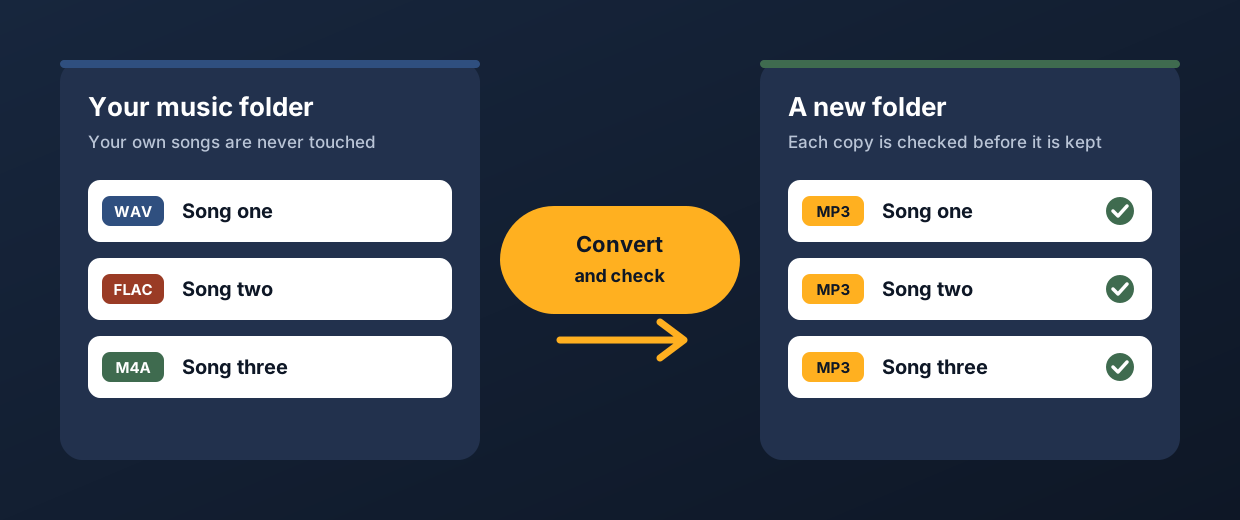
Convert copies the songs in your library into the type you choose, MP3, M4A, OGG, FLAC, WAV, or AIFF, and puts the new songs in a new folder, so your own songs are never changed. It checks every new song before it keeps it, and it carries the artist, title, album, and cover picture across, and it is free, because it runs on your own computer and costs us nothing to run.
Join the waiting list
We will email you once, when Convert and the tools open.
Why convert a library in one go
A library collects songs in every type: FLAC and AIFF from a shop, WAV from a recording program, and MP3 and M4A from everywhere else. A USB stick, a player, or a DJ setup that wants one type means converting hundreds or thousands of songs, one folder at a time, and checking by hand that none came out cut short or lost its tags.
Free converters exist, and some of them are very good, so Convert is not the only way to do this. What it adds is that it works through a whole library in one go, and copies your folder layout, and checks every new song, and sits in the same program as the tools that clean a library up.
How Convert will work
You choose the type
On the Start screen you pick the type you want, MP3 at 320 or 192 kbps, M4A at 256 kbps, OGG, FLAC, WAV, or AIFF, and you choose whether to convert only your lossless songs, which is the default, or all of your songs.
It writes into a new folder
The new songs go into a new folder beside your music folder, called Repair My Music converted, with a sub-folder for the type, and your own sub-folders are copied across, so everything stays where you would look for it, and your original songs are not touched.
It checks every new song
Each new song is decoded from start to end, and its length has to match the original, and its artist, title, and album have to be there, and so does its cover picture where that type can hold one, and only then is it moved into place, so a song that fails is not kept as a bad copy.
It carries on where it stopped
A song that is already the type you chose, or is already converted, is left alone, so you can stop a long run and start it again later, and when it finishes the program tells you if any songs could not be converted.
What each type keeps
| Type you choose | Kind | Cover picture | BPM and key |
|---|---|---|---|
| MP3 at 320 kbps | Lossy | Kept | Kept |
| MP3 at 192 kbps | Lossy | Kept | Kept |
| M4A at 256 kbps | Lossy | Kept | Cannot be held |
| OGG | Lossy | Cannot be held | Kept |
| FLAC | Lossless | Kept | Kept |
| WAV | Lossless | Cannot be held | Cannot be held |
| AIFF | Lossless | Kept | Kept |
Artist, title, and album are carried across for every type. Where a type cannot hold a cover picture, or BPM and key, the program tells you.
What it will do
- Copy your songs into a new folder as MP3 at 320 or 192 kbps, M4A at 256 kbps, OGG, FLAC, WAV, or AIFF, with your folder layout kept.
- Check every new song before it keeps it.
- Carry the artist, title, and album across, and the cover picture, and BPM and key, wherever the new type can hold them.
- Keep a lossless song at its own bit depth and sample rate when the new type is lossless.
- Carry on where it stopped, if you stop it.
What it will not do
- Change, move, or delete your original songs.
- Make a song sound better by converting it. A lossless copy of an MP3 is a bigger file, and the sound that the MP3 threw away does not come back, which is why only lossless songs are converted unless you choose all songs.
- Keep more than two channels or more than 48 kHz in an MP3, so a surround song or a 96 kHz song is mixed down or lowered when it becomes an MP3.
- Run on a Mac yet. The first version is for Windows.
Questions about Convert
Is Convert really free?
Yes. Convert will be free, because it runs on your own computer with the converter that comes with the program, so it costs us nothing to run, and the six tools that fix a library are the part we will sell.
Does it change my original songs?
No. It reads your songs and writes new ones into a new folder, and in our tests every original was byte for byte the same afterwards.
Which songs does it convert?
By default only your lossless songs, FLAC, WAV, AIFF, and Apple Lossless, because turning a lossy song such as an MP3 into a lossless type makes a bigger file and cannot bring back sound that was already thrown away, and you can choose all songs if you want that anyway. We tested it on MP3, M4A, WAV, FLAC, AIFF, and OGG songs.
Is it a good idea to convert one lossy type into another?
Usually not. Every conversion between lossy types, for example MP3 to M4A, loses a little more detail, and nothing brings it back, so if you can, convert from your lossless originals, which is why the default leaves lossy songs alone.
What about tags and cover pictures?
Artist, title, and album are carried across for every type, and the cover picture for MP3, M4A, FLAC, and AIFF, and BPM and key for MP3, AIFF, FLAC, and OGG. A WAV or OGG file cannot hold a cover picture here, and an M4A or WAV file cannot hold BPM and key, and the program tells you when that applies.
Does Convert repair, level, or rename my songs?
No. Convert is a separate free extra, and it only copies your songs into another type, and the tools that fix a library are the six listed below.
Is there a Mac version?
Windows first. We are thinking about a Mac version, and we will say so on this site if we build one.
The six tools that fix a library
Volume
Brings quiet and loud songs to one level, and never re-encodes a lossy song to do it.
Trim
Finds dead air before and after songs, and trims it without re-encoding.
Splitter
Cuts any song or recording in two where you choose, and finds files that hold two songs.
Duplicates
Finds copies of the same song and suggests which to keep.
Broken files
Finds damaged, cut-short, and unloadable files before they fail mid-set.
Names
Tidies messy file names and names unnamed songs from your own library.
Want Convert when it opens?
Join the waiting list and we will email you once, when Convert and the tools are ready.