Remove silence from audio files at the start and end of songs
Trim will find songs that have dead air before they start or after they finish, let you listen to the spot, and trim the ones you choose. The sound is copied as it is, and the original goes to the Windows Recycle Bin.
Join the waiting list
We will email you once, when Trim opens.
The problem
Dead air at the start or end of a song is common in rips and downloads, and it makes a gap when a player moves on to the next song, and it makes it harder to hear where a song really finishes.
Songs taken from DJ-mix CDs have a different problem, and they were blended into the next track, so on their own they stop dead with no fade. The file is not damaged, but you may not want to play it that way.
In our test library, 11,291 songs end with five seconds or more of silence, and 2,557 are mix-CD tracks that stop dead.
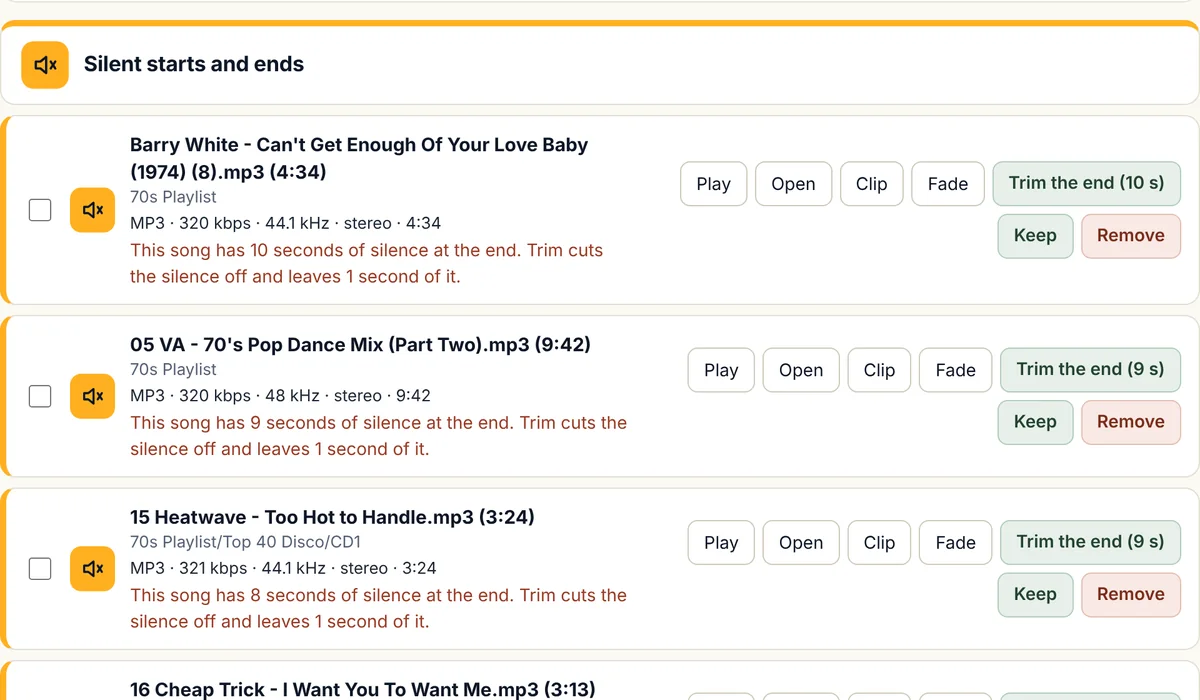
How Trim will remove silence from your songs
It reads only the start and end
Trim reads only the first and last seconds of each song, so it is much quicker than listening to every song.
You listen first
Play the start or the end from the list before you decide. For each song you can keep it, remove it or trim it.
Trim silence from ends in bulk
Silent ends can be trimmed for many songs at once, and each trimmed song keeps one second of silence at the end.
Trim starts one song at a time
Cutting the start of a song moves everything after it, including any cue points you have set in DJ software, so check those songs first.
The sound is copied, not re-encoded
The trimmed copy takes the place of the original, and the original goes to the Windows Recycle Bin, where you can restore it.
Fade a song in or out
For a song from a mix CD that stops dead, you can add a fade-out, a fade-in, or both, and you choose the points yourself: where the fade starts and where the song is silent. You hear the result before you apply it, and Undo puts the song back.
Clip any part of a song
Clip saves the part of a song you choose as its own file, with the sound copied as it is, and the original stays unless you choose to replace it, and a clip can have a fade at its start or end too.
Which file types
- MP3Works
- MP2Works
- M4AWorks
- WMAWorks
- WAVWorks
- FLACWorks
- AIFFWorks
- OGGWorks
Some types are handled differently, and that is our rule, not a limit of the music files. The reasons are at the top of the file-types table.
N/A means we do not offer it for that type. FLAC, AIFF, and OGG were tried on real songs from our own library that we converted into those types, on a Windows computer, and we have not yet tried files that came from a shop. MP2 was tried on real MP2 songs from our own library, and not yet on Windows.
What it will do
- Find silence before a song starts and after it ends, and songs from mix CDs that stop dead.
- Fade a song in or out at points you choose, and let you hear the fade first.
- Let you hear the spot before anything changes.
- Copy the sound as it is, with nothing re-encoded.
- Send the original to the Recycle Bin so you can restore it.
What it will not do
- Add sound that is not in your file. A fade only ever changes the song you give it. It does not extend a song or add music from anywhere else.
- Remove silence from the middle of a song. Finding a long silence in the middle of a file is the job of Splitter.
- Run on a Mac yet. The first version is for Windows.
Questions about Trim
Why does silence at the end of a song matter?
Silence at the end of a file makes a gap between songs when a player moves on by itself, and it hides where the song really ends. For a DJ it also means more time spent finding the usable part of a song.
Does Trim change the quality of my songs?
No. A trim of an MP3, MP2, M4A, WMA, or WAV song copies the sound as it is, with nothing decoded and encoded again, and a FLAC song is written out again as FLAC, which keeps every sample. A fade does change the sound, on purpose, and the question about fades below says how each type is done.
Can I undo a trim?
Yes. The original of each trimmed song goes to the Windows Recycle Bin, and you can restore it from there.
What about songs from mix CDs?
A song taken from a DJ-mix CD was blended into the next one, so on its own it stops with no fade, and the file is not damaged. You choose to keep it, remove it or trim it.
Do I need to close my DJ software first?
Yes. Close DJ software such as MixMeister or djay Pro before trimming, so the program can replace the files. Cue points at the start of a song stay where they are when you trim an end.
Which file types does it handle?
Trim is tested on MP3, M4A, WMA, and WAV files, and on real MP2 songs from our own library, where a cut song keeps its artist and title. It also cut OGG, AIFF, and FLAC songs correctly when we converted real songs from our own library into those types and tried it on a Windows computer, and a cut song kept its tags, and its cover picture in FLAC and AIFF, but we have not yet tried files that came from a shop in those types. A FLAC song is written out again as FLAC so that its length is right, and in our test no sample changed.
Can it fade a song in or out?
Yes, at the points you choose, and you hear the fade before you apply it. An MP3 is faded without re-encoding: the volume setting inside the file is lowered a little at a time, in steps of 1.5 dB. WAV, AIFF, FLAC, and Apple Lossless songs are written out again in the same lossless format with the fade in them. An M4A or OGG song can only be faded by re-encoding it, which costs a little quality, so the program asks first, and does one song at a time. An MP2 song is not faded yet, and a WMA song is not faded, because the only WMA encoder we have added noise in our test, and for every fade the original is kept, and Undo puts the song back.
Can it make a song longer?
No. A fade only changes the song in your own file, and we looked at extending a song and decided not to build it: the result is hard to make sound right, and it would mean making new music from yours. Trim contains no music and downloads none.
How do I remove silence from MP3 files?
Trim finds the MP3 files with silence at the start or the end, you hear the spot, and you choose to trim it, and the sound is copied, not re-encoded. It also works on M4A, WMA, and WAV files.
Is this a silence remover for audio files?
Yes, for the silence at the start and end of a song. It finds those songs across a whole library, you hear each spot, and you choose what to trim, and it does not cut silence out of the middle of a song.
The other five tools
Volume
Brings quiet and loud songs to one level, and never re-encodes a lossy song to do it.
Splitter
Cuts any song or recording in two where you choose, and finds files that hold two songs.
Duplicates
Finds copies of the same song and suggests which to keep.
Broken files
Finds damaged, cut-short, and unloadable files before they fail mid-set.
Names
Tidies messy file names and names unnamed songs from your own library.
Want Trim when it opens?
Join the waiting list and we will email you once, when it is ready.