Rename MP3 files and name songs that have no name
Names will tidy file names such as "Track 04" and "(Official Video)", and give unnamed songs a name by matching them against a named copy of the same recording in your own library. You approve every change, and every rename can be undone.
Join the waiting list
We will email you once, when Names opens.
The problem
Download sites and rips leave their marks in file names: only a track number, no artist, or tails such as "(Official Video)", a downloader's name or a web address. Names like these are hard to search, hard to sort and hard to trust.
Some songs have no usable name at all, only "Unknown" or "Track 04". Often you have the same recording elsewhere in your library with a proper name, but nobody has the time to find it by ear.
In our test library, 5,485 names were ready to approve.
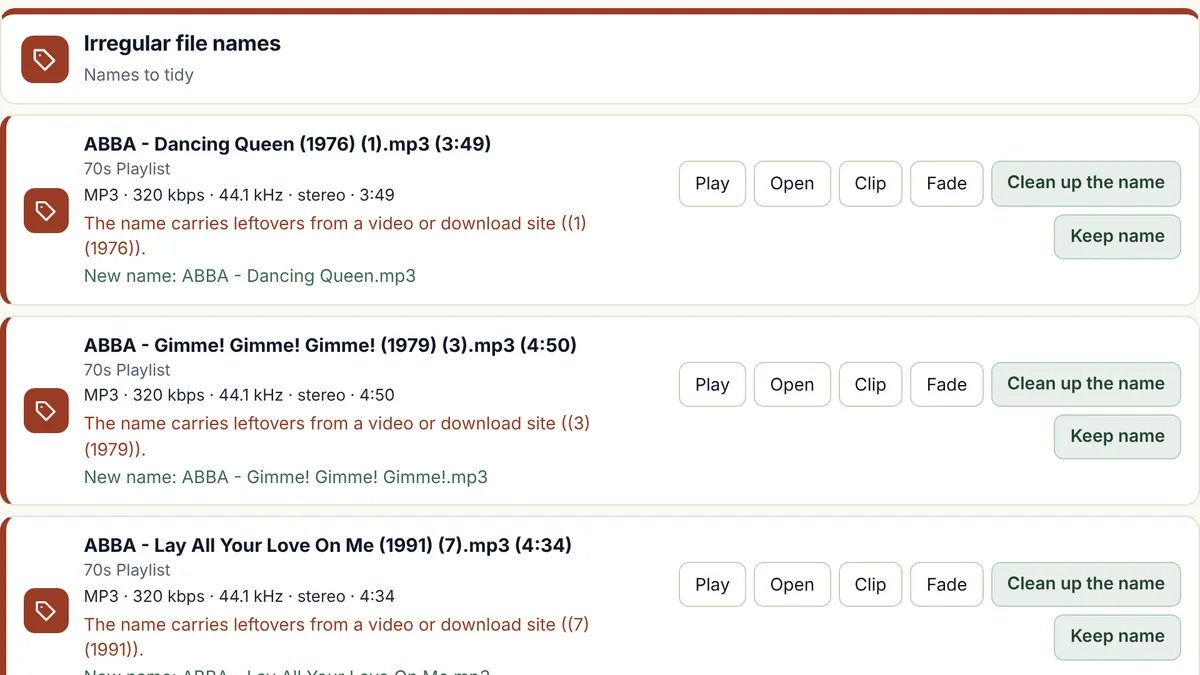
How Names will rename MP3 files and name unknown songs
It finds names that need tidying
These are names that are only a track number, names with no artist, and leftovers from download sites such as "(Official Video)", VDownloader, and web addresses.
It suggests a clean name
The artist is taken from the details saved inside the file, and you approve each new name before anything is renamed. Where a name starts with a track number, you can choose to keep it or drop it.
It matches nameless songs to your own library
When the artist is missing or the name is only a placeholder such as Unknown or Track 04, Names listens to the song and looks for a named copy of the same recording elsewhere in your library. If it finds one, it suggests that copy's name as "Artist - Title", with no track number.
It marks the uncertain ones
A match it is less sure of is marked "listen first", so you can play the song before you decide.
Nothing leaves your computer
Matching against your own library happens on your computer and sends nothing over the internet.
Every rename can be undone
Press Undo on a song and the old name comes back. Close the song in your DJ software first.
Which file types
- MP3Works
- MP2Works
- M4AWorks
- WMAWorks
- WAVWorks
- FLACWorks
- AIFFWorks
- OGGWorks
Some types are handled differently, and that is our rule, not a limit of the music files. The reasons are at the top of the file-types table.
N/A means we do not offer it for that type. FLAC, AIFF, and OGG were tried on real songs from our own library that we converted into those types, on a Windows computer, and we have not yet tried files that came from a shop. MP2 was tried on real MP2 songs from our own library, and not yet on Windows.
What it will do
- Suggest tidy names for files with only a track number, no artist, or download-site leftovers.
- Name unnamed songs from a named copy of the same recording in your own library.
- Show every change for you to approve first, and let you undo it afterwards.
What it will not do
- Name a song that has no named copy in your library. An online music database for those songs is planned for later. It will need the internet and a free key that you register yourself.
- Change the details saved inside a file. Names changes file names only. Writing the artist, title, album, and year into files is planned for later.
- Run on a Mac yet. The first version is for Windows.
How Names compares with MusicBrainz Picard and Mp3tag
MusicBrainz Picard and Mp3tag are tag editors that can also rename files, and Picard looks each song up in the MusicBrainz database over the internet.
Names is built for tidying the file names across a big library. It works out a missing name from the details saved in the file, and from a named copy of the same recording in your own library, and it does that on your own computer with no internet needed. It changes file names only, so the tags inside your songs are never touched, and you approve each name, and every rename can be undone.
Facts about the other tools were checked on 12 November 2026. Sources: MusicBrainz Picard introduction; Picard and AcoustID, Picard documentation; Mp3tag, AlternativeTo; Mp3tag, SourceForge; MusicBrainz Picard, LO4D.
Questions about Names
Will it rename my files without asking?
No. Every suggested name is shown to you first, and nothing changes until you approve it.
How do I fix messy MP3 file names?
Names lists the files whose names are only a track number, have no artist, or carry leftovers from download sites, and it suggests a clean name for each, you approve it, and every rename can be undone.
Can it identify unknown MP3 files?
Yes, when your library holds a named copy of the same recording. Names listens to the unknown file and to the files you already have, and suggests the name of the matching copy. Looking songs up in an online music database is planned for later.
Does it work on files other than MP3?
Yes. It renames MP3, MP2, M4A, WMA, and WAV files, and it listens to those types to match a song to a named copy, and FLAC, AIFF, and OGG songs were tried on a Windows computer after we converted real songs from our own library into those types, and renaming left every song's sound and tags unchanged, but not yet on files that came from a shop.
How does it know two files are the same song?
It compares how the two files sound, not what they are called, so a file called "Track 04" can be matched to a properly named copy.
Can it name songs that are not in my library?
Not yet. Looking songs up in an online music database is planned for later, and it will need the internet and a free key that you register yourself.
What if two copies carry different names?
Then the song is marked "listen first" so that you can decide which name is right.
Will renaming break my DJ software's library?
Most DJ software remembers a song by its file path, so a renamed file can show as missing until the software finds it again. Check how yours handles renamed files before you rename a large library, and close it before you start.
The other five tools
Volume
Brings quiet and loud songs to one level, and never re-encodes a lossy song to do it.
Trim
Finds dead air before and after songs, and trims it without re-encoding.
Splitter
Cuts any song or recording in two where you choose, and finds files that hold two songs.
Duplicates
Finds copies of the same song and suggests which to keep.
Broken files
Finds damaged, cut-short, and unloadable files before they fail mid-set.
Want Names when it opens?
Join the waiting list and we will email you once, when it is ready.