Find corrupt MP3 files and incomplete songs in your library
Broken files will scan a whole library, or just one folder that you choose, for songs that are damaged or stop before the end, and a library scan also finds files that will not load and songs too short to be a song, and it finds them so you can listen and decide, and it does not repair files.
Join the waiting list
We will email you once, when Broken files opens.
The problem
A broken file usually shows itself at the worst time: the song skips, stops half way, or will not load as you play it out. In a library of tens of thousands of songs nobody finds corrupt MP3 files by listening.
There are three kinds of trouble. A corrupt file breaks in the middle. An incomplete file stops before the song ends, for example when a download stopped early. And some files will not load in DJ software at all, for reasons that have nothing to do with the sound: they exist only in the cloud, they are empty, they are not a type of file the software plays, or their path is too long for Windows.
Our test library had 202 corrupt or incomplete files, 265 files that would not load and 469 clips shorter than 90 seconds.
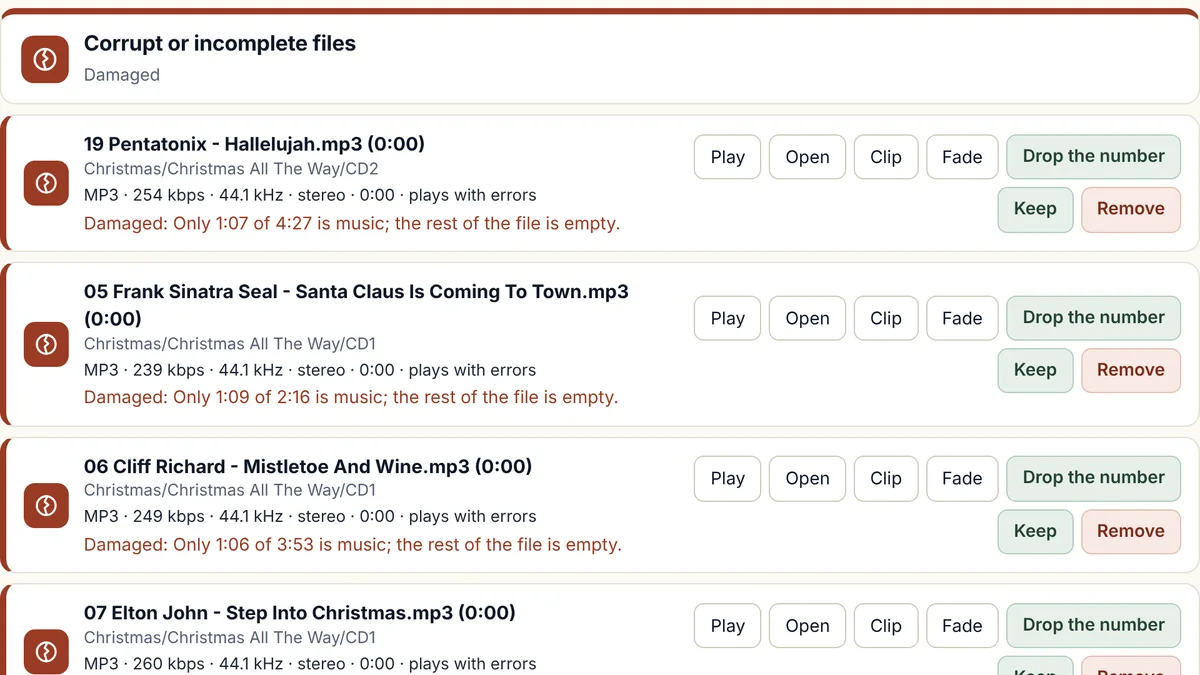
How Broken files will find corrupt MP3 files
It reads each song all the way through
Every song is read from start to finish, the way a player would read it, and the program counts the errors it meets, and it also compares how long the song really plays with the length the file claims. You do not have to listen.
It sorts what it finds
Damaged files, files cut short, files that will not load, and files too short to be a song (under 90 seconds) go on separate lists.
You listen and decide
Play a file from the list, then keep it or remove it. Removed files go to the Windows Recycle Bin.
Or check just one folder
Choose any folder, on this computer, on a USB stick or on another drive, and the program counts the songs, shows how long the check will take, and plays every song in that folder quietly, and then lists the damaged and cut-short songs it found. Use it on a new download or a stick before you rely on it. The results for your music folder are left as they were.
Which file types
- MP3Works
- MP2Works
- M4AWorks
- WMAWorks
- WAVWorks
- FLACWorks
- AIFFWorks
- OGGWorks
Some types are handled differently, and that is our rule, not a limit of the music files. The reasons are at the top of the file-types table.
N/A means we do not offer it for that type. FLAC, AIFF, and OGG were tried on real songs from our own library that we converted into those types, on a Windows computer, and we have not yet tried files that came from a shop. MP2 was tried on real MP2 songs from our own library, and not yet on Windows.
What it will do
- Find files that break in the middle, and files that stop before the song ends.
- Check one folder on its own, such as a USB stick or a new download, and list the damaged and cut-short songs in it.
- Find files that will not load: online-only files, empty files, file types the software cannot play and paths that are too long.
- List clips shorter than 90 seconds, so you can listen and decide.
- Send removed files to the Recycle Bin, so you can restore them.
What it will not do
- Repair files. A damaged song may be missing real sound, so the safe step is to find it, replace it from the original source and remove the bad one.
- Fix a song that has the wrong name. That is a job for Names.
- List files that will not load, or clips under 90 seconds, when you check a single folder. The one-folder check lists damaged and cut-short songs, and the scan of your whole library lists the rest.
- Spot an MP2 or OGG song that was cut short, because those files do not store their own length, so there is nothing to compare it with, although the scan still finds MP2 and OGG songs that are damaged, will not load, or are under 90 seconds.
- Spot a cut-short MP3 that has no length stored inside it, because there is nothing to compare it with, although the scan still lists it when it is under 90 seconds.
- Find a small damaged spot in the middle of a FLAC or AIFF song, because those types give the scan nothing to check it against, although it does find a FLAC or AIFF song that stops early or will not load.
- Run on a Mac yet. The first version is for Windows.
How Broken files compares with MP3val, MP3 Diags, and foobar2000
MP3val is a free, open source program that you run from a command line. It checks that an MP3 file splits cleanly into MPEG frames and that the frame count and length stored in its header are right, and it can repair many of the problems it finds, but it does not decode the audio inside the frames.
MP3 Diags is an open source program with a window that finds more than 50 kinds of problem in MP3 files, such as broken tags and headers, a missing VBR header, and low-quality audio, and it can fix many of them, including wrong song lengths and seeking problems. Because it changes the files, its own documentation advises you to back them up first.
foobar2000 is a music player, and its file verifier, a component in older versions and built in from version 2.0, checks files for decoding errors by decoding them, and for most file types it only catches errors that stop the decoding.
Broken files reads every song all the way through, the way a player would, and counts the errors it meets, and it works on MP3, MP2, M4A, WMA, WAV, FLAC, AIFF, and OGG files, on a whole library or on one folder. It also compares the length each file claims with the length that really plays, and it lists files that will not load and clips under 90 seconds. It does not repair anything, so when you want a wrong length or a missing header corrected inside an MP3 file, MP3val and MP3 Diags can do that, and Broken files lists the songs that need it.
Facts about the other tools were checked on 14 November 2026. Sources: MP3val documentation; MP3 Diags; MP3 Diags, gHacks; foo_verifier, foobar2000.
Questions about Broken files
How do I check MP3 files for errors?
Run the scan on your library, and each song is read from start to finish without you having to listen, and files that are damaged or stop early go on a list for you to listen to. Incomplete MP3 files, which stop before the song ends, are listed separately.
Can I check just one folder?
Yes. Choose any folder, on this computer, on a USB stick or on another drive, and the program plays every song in it quietly and lists the ones that are damaged or cut short. It shows how long the check will take before you start, it does not change your music, and the results for your music folder are left as they were.
Will it repair the broken files?
No. It finds them. A damaged file may be missing sound that cannot be recovered, so the safe answer is usually a fresh copy from the original source.
Why does my player show the wrong length for a song?
An MP3 file stores its own length, and a player shows that number, so a song that was cut short can still show its full time. Broken files compares the stored length with the length that really plays, and it lists the song as cut short when the file claims more than 3 seconds longer, or more than 2 percent longer when that is a bigger difference. It does not list a file that is out by only a second or two, or a file that claims a shorter time than it plays, and it does not correct the stored length. MP3val and MP3 Diags can correct the length stored in an MP3 file.
How is Broken files different from MP3 Diags, MP3val, and foobar2000?
MP3val and MP3 Diags look at how an MP3 file is built and can repair many problems they find, and the foobar2000 file verifier decodes files to look for errors. Broken files reads every song all the way through, works on MP3, MP2, M4A, WMA, WAV, FLAC, AIFF, and OGG files, compares the stored length with the length that plays, and lists files that will not load and clips under 90 seconds, for a whole library or one folder. It does not repair anything, so use it to find the songs, and use MP3val or MP3 Diags if you want a wrong length or header corrected.
What does "will not load" mean?
These are files that DJ software may not be able to open: files that are only in OneDrive or Dropbox and not on your computer, empty files, files that are not MP3 or WAV, and paths that are too long for Windows. In our test library, 220 of the 265 were M4A files and 43 were WMA files.
Why are short clips listed?
Files shorter than 90 seconds are often sound effects, or songs that were cut off, and you listen to each one and choose whether to keep it.
How long does it take?
Scanning every song for damage and silence took about 7.7 hours on our 60,902-song library, at about two songs a second, and it runs in the background, and you can stop it, and carry on later.
Does it change my music?
Not until you choose. The scan only reads your files.
The other five tools
Volume
Brings quiet and loud songs to one level, and never re-encodes a lossy song to do it.
Trim
Finds dead air before and after songs, and trims it without re-encoding.
Splitter
Cuts any song or recording in two where you choose, and finds files that hold two songs.
Duplicates
Finds copies of the same song and suggests which to keep.
Names
Tidies messy file names and names unnamed songs from your own library.
Want Broken files when it opens?
Join the waiting list and we will email you once, when it is ready.