Find duplicate music files in a big library
Duplicates is a duplicate music file finder for big libraries, and it will find songs that are saved more than once: exact copies, and the same song in different files. It suggests the best copy to keep, and one copy of every song always stays.
Join the waiting list
We will email you once, when Duplicates opens.
The problem
Duplicates build up quietly. A song is downloaded twice, copied into a second folder, saved in two formats or synced to a second place. Soon a large library holds several copies of the same song, and each one takes space and clutters your search results.
Finding exact copies is easy. Finding the same song saved as two different files is harder, and deciding which copy to keep is harder still.
In our test library, 10,391 songs had at least one extra copy. Together the extra copies came to 18,913 files and about 169 GB.
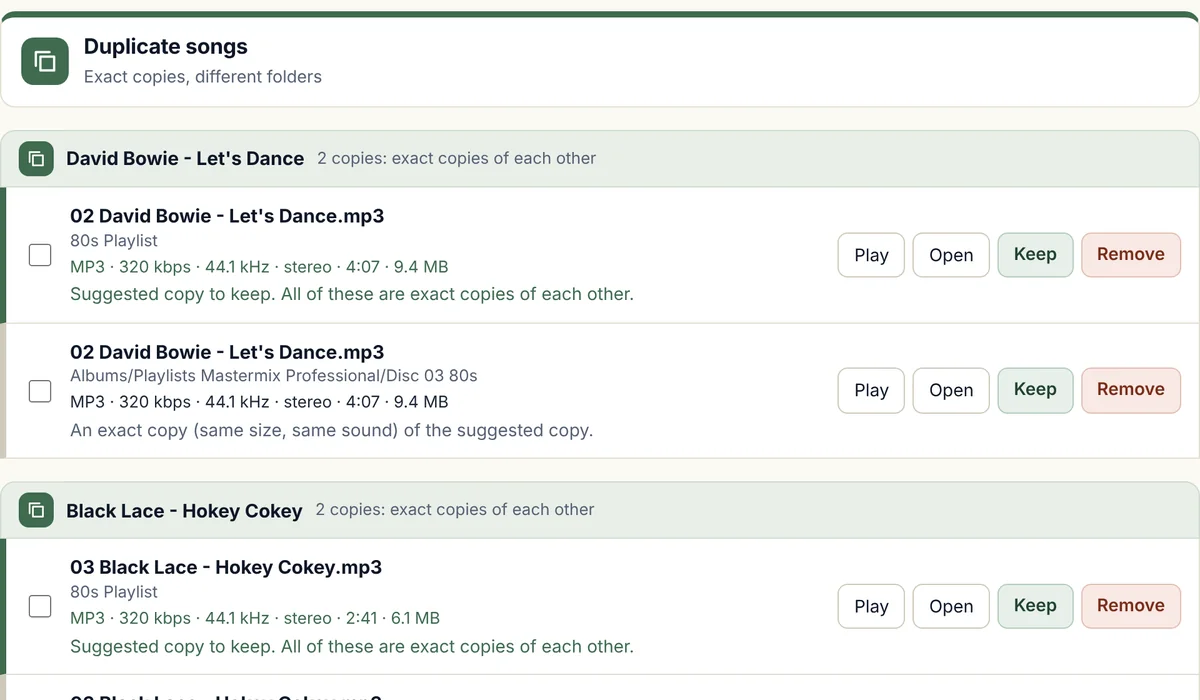
How Duplicates will find duplicate music files
It finds exact copies
Files with the same size and the same sound are grouped as exact copies, whether they sit in one folder or in different folders.
It finds the same song in different files
Files with the same artist and title saved inside them, and a play time that agrees, are grouped as the same song, and they might be different formats, different bitrates or different rips.
It suggests the best copy to keep
In each group one copy is ranked first, and a song that plays cleanly beats one with errors, lossless beats lossy and a higher bitrate beats a lower one. Names such as "Song (1)" or "Song - Copy" count against a file, and a note under each copy says why it is better or worse.
You tick what to remove
Nothing is removed until you choose. One copy of every song always stays, even if you tick them all.
Removals go to the Recycle Bin
You can restore any file from there.
Which file types
- MP3Works
- MP2Works
- M4AWorks
- WMAWorks
- WAVWorks
- FLACWorks
- AIFFWorks
- OGGWorks
Some types are handled differently, and that is our rule, not a limit of the music files. The reasons are at the top of the file-types table.
N/A means we do not offer it for that type. FLAC, AIFF, and OGG were tried on real songs from our own library that we converted into those types, on a Windows computer, and we have not yet tried files that came from a shop. MP2 was tried on real MP2 songs from our own library, and not yet on Windows.
What it will do
- Find exact copies in one folder or in different folders.
- Find the same song saved as different files, using the artist and title inside each file and the play time.
- Suggest the best copy to keep, and say why.
- Always leave at least one copy of every song.
What it will not do
- Pair up files whose artist and title saved inside them differ or are missing. Finding duplicates by sound is planned for later.
- Clean the duplicate lists inside iTunes, Apple Music or Spotify. It works on music files in folders.
- Run on a Mac yet. The first version is for Windows.
How Duplicates compares with dupeGuru
dupeGuru is a free, open source duplicate finder with a music mode, and it matches songs by file name, tags, or file contents.
Duplicates is built around music libraries. It finds exact copies by size and sound, and it groups the same song across MP3, MP2, M4A, WMA, and WAV files by artist, title, and play time. Each group ranks the copies and says why, and one copy of every song always stays, even if you tick them all.
Facts about the other tools were checked on 12 November 2026. Sources: dupeGuru, MajorGeeks; dupeGuru Music Edition, AlternativeTo; dupeGuru Music Edition settings, I Love Free Software.
Questions about Duplicates
How do I find duplicate MP3 files?
Point the scan at your music folders, and Duplicates groups exact copies, and groups the same song saved as different files by its artist, title, and play time. You then tick the copies to remove, and the ones you remove go to the Recycle Bin.
Can it delete the only copy of a song?
No. One copy of every song always stays, even if you tick every copy in a group.
How does it decide which copy is best?
It looks first at whether the song plays cleanly, then at the file type and bitrate. After that it prefers a file with an artist and title saved inside it, a name that does not look like a second copy, a longer play time and a tidier folder. The suggestion is only a suggestion, and you can change it.
What about the same song as an MP3 and as an M4A or FLAC?
If the artist, title, and play time agree, the two files are grouped as the same song, and a lossless file is suggested as the one to keep. Our library had MP3, M4A, WMA, and WAV files but no FLAC files, so we tried FLAC, AIFF, and OGG grouping on real songs that we converted into those types, on a Windows computer, and it grouped the copies correctly, but not yet on files that came from a shop.
What about remixes and radio edits?
A remix or an edit with a different play time is not a copy, and the play time has to agree, and every group is shown to you before anything is removed.
How long does it take?
Finding exact copies, empty files, and odd file types took 25 seconds on 60,525 files in our library.
The other five tools
Volume
Brings quiet and loud songs to one level, and never re-encodes a lossy song to do it.
Trim
Finds dead air before and after songs, and trims it without re-encoding.
Splitter
Cuts any song or recording in two where you choose, and finds files that hold two songs.
Broken files
Finds damaged, cut-short, and unloadable files before they fail mid-set.
Names
Tidies messy file names and names unnamed songs from your own library.
Want Duplicates when it opens?
Join the waiting list and we will email you once, when it is ready.