Normalize MP3 volume across a whole library: an MP3Gain alternative
Volume will bring the songs in your library to the same level, so you stop reaching for the gain knob between songs. In an MP3 or M4A it changes the volume setting stored inside the file, the same way MP3Gain does for MP3, so the sound is not re-encoded. WAV, AIFF, and FLAC songs have no such setting, so they are rewritten in the same lossless format, with the original kept. Every change can be undone.
Join the waiting list
We will email you once, when Volume opens.
The problem
Songs arrive from many places: old CD rips, downloads, files from friends, tracks bought from different shops. They were mastered at very different levels, so one song sits quietly in a playlist and the next one jumps out of the speakers.
Most DJ software can adjust the gain of a track inside its own library, and Volume works on the files themselves, so the change follows the song to any player, any USB stick, and any program you open it in.
In our own test library, 34,576 of 60,902 songs were a step or more away from the normal level, and the problem is rarely a handful of odd files.
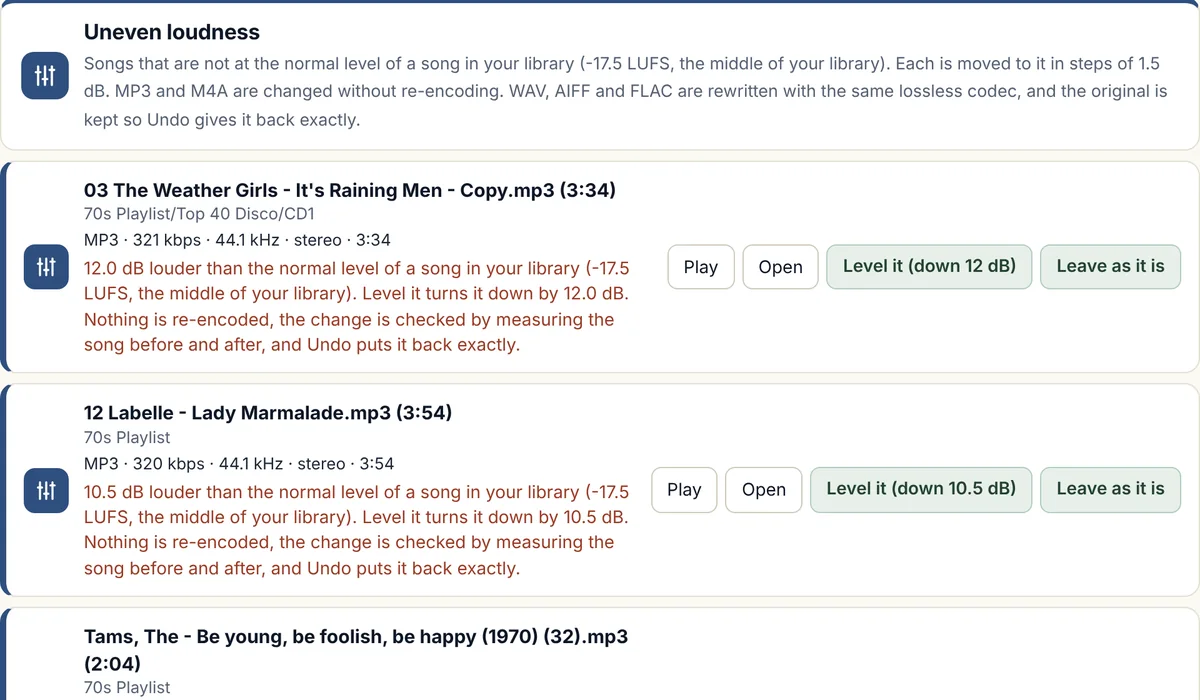
How Volume will normalize your music files
It measures every song
Volume reads each song in your library and measures how loud it sounds, and it does not play the songs out loud, and a large library is worked through in the background.
It finds the normal level
It works out the normal level of a song in your library, and lists every song that sits a step or more away from it.
You check the list
Nothing changes until you press a button, and you choose which songs to move, or you choose them all.
It moves each song in steps of 1.5 dB
Each chosen song is turned up or down by whole steps of 1.5 dB. In an MP3 or M4A the change is made to the volume setting stored inside the file (inside the MP3, or inside each frame of an M4A), so the sound is not decoded and encoded again. A WAV, AIFF, or FLAC song has no such setting, so it is written out again in the same lossless format with the new volume, and its original is kept.
It checks its own work
The program measures a song before and after the change to confirm it moved by the amount planned, and a song that is already close to the loudest it can be is not turned up any further, so it does not distort.
Undo puts everything back
One undo command puts every changed song back exactly as it was, byte for byte, and a rewritten song is put back from the original that was kept for it, and each song keeps its name.
Which file types
- MP3Works
- MP2N/A
- M4AWorks
- WMAN/A
- WAVWorks
- FLACWorks
- AIFFWorks
- OGGN/A
Some types are handled differently, and that is our rule, not a limit of the music files. The reasons are at the top of the file-types table.
N/A means we do not offer it for that type. FLAC, AIFF, and OGG were tried on real songs from our own library that we converted into those types, on a Windows computer, and we have not yet tried files that came from a shop. MP2 was tried on real MP2 songs from our own library, and not yet on Windows.
What it will do
- Move MP3, M4A, WAV, AIFF, and FLAC songs up or down to the normal level of your own library, in steps of 1.5 dB.
- Leave MP3 and M4A sound as it is, because nothing is re-encoded, and rewrite WAV, AIFF, and FLAC songs in the same lossless format.
- Let you undo every change with one command.
What it will not do
- Change MP2, WMA, or OGG songs, or Apple Lossless songs saved as M4A. The scan measures them, but Volume does not change them. MP2, WMA, and OGG are lossy, and we know of no way to change their volume without re-encoding the sound, which Volume does not do. The reasons are at the top of the file-types table.
- Match an outside standard such as the 14 LUFS level that Spotify normalises to. It levels your songs to the normal level of your own library.
- Squash or compress the music. It changes the volume of the whole song and leaves the difference between its loud and quiet parts alone.
- Make fine adjustments. The smallest change possible is 1.5 dB.
- Run on a Mac yet. The first version is for Windows.
How Volume compares with MP3Gain
| Compared on | MP3Gain | Repair My Music Volume Coming soon |
|---|---|---|
| Method | Changes the volume setting inside each MP3 frame, and nothing is re-encoded. | The same method for MP3. For M4A it changes the matching value inside each AAC frame, also with nothing re-encoded, and WAV, AIFF, and FLAC have no such setting, so those songs are written out again in the same lossless format. |
| Smallest step | 1.5 dB | 1.5 dB |
| Undo | Yes, using information it saves in the file's tags | Yes. One undo command puts every changed song back as it was. |
| Target level | A fixed target, 89 dB unless you change it | The normal level of your own library |
| File types | MP3 | MP3 and M4A, and WAV, AIFF, and FLAC by a lossless rewrite |
A newer free project called mp3rgain also changes M4A files without re-encoding, and Volume uses it for M4A songs.
Facts about the other tools were checked on 12 November 2026. Sources: MP3Gain, Wikipedia; Hydrogenaudio: what MP3Gain stores in a file; mp3rgain documentation.
Questions about Volume
Is this an MP3Gain alternative?
Yes, it does the same lossless job on MP3 files, by changing the volume setting inside each frame in steps of 1.5 dB, and it can undo its changes too. It also works on M4A files, and on WAV, AIFF, and FLAC files by a lossless rewrite, and it levels your songs to the normal level of your own library instead of a fixed target, and measures each song again after the change to check it. Volume is not released yet. How they compare.
Can it normalise a whole library at once?
Yes. Volume measures every song, lists the songs that sit a step or more away from the normal level, and moves the ones you choose, or all of them, in one go.
Does evening out the volume lower the sound quality?
For MP3 and M4A no re-encoding happens, so the change itself adds no new loss of quality, and a WAV, AIFF, or FLAC song is written out again in the same lossless format, so nothing that was in the file is thrown away. The new volume is rounded to the file's own bit depth, as it is in any audio editor. Turning a quiet song up does make any background noise in it louder too, and a song is never turned up past the point where it would distort.
What is the difference between this and ReplayGain?
ReplayGain stores a number in the file's tags and asks the player to apply it, so the audio data does not change, and Volume changes the volume setting in the file itself, so it works in players that ignore ReplayGain. Our guide explains both.
Will it work on M4A, FLAC, WMA, or WAV files?
M4A, WAV, AIFF, and FLAC, yes. Volume changes the volume value inside each AAC frame of an M4A, with nothing re-encoded, and WAV, AIFF, and FLAC songs are written out again in the same lossless format, with the original kept so Undo can give it back byte for byte. Volume does not change MP2, WMA, or OGG songs, because that would mean re-encoding the sound, and the FLAC and AIFF rewrites were tried on real songs from our own library that we converted into those types, on a Windows computer, and not yet on files that came from a shop.
Why is a rewrite fine for WAV and FLAC but not for WMA or OGG?
Because of what the type is. WAV, AIFF, and FLAC keep every detail of the sound, so writing the song out again in the same format loses nothing that was in the file. MP2, WMA, and OGG keep sound that was already squeezed once, and each new encode throws away more of it for good. We made not re-encoding lossy songs our rule for that reason. The full reasons are at the top of the file-types table.
Can I undo it?
Yes. One undo command puts every changed song back exactly as it was.
Is it for Windows or Mac?
Windows first. We are thinking about a Mac version, and we will say so on this site if we build one.
The other five tools
Trim
Finds dead air before and after songs, and trims it without re-encoding.
Splitter
Cuts any song or recording in two where you choose, and finds files that hold two songs.
Duplicates
Finds copies of the same song and suggests which to keep.
Broken files
Finds damaged, cut-short, and unloadable files before they fail mid-set.
Names
Tidies messy file names and names unnamed songs from your own library.
Want Volume when it opens?
Join the waiting list and we will email you once, when it is ready.